![Xappex-logo-with-name.png]](https://knowledge.xappex.com/hs-fs/hubfs/Xappex-logo-with-name.png?height=40&name=Xappex-logo-with-name.png)
XL-Connector offers a new mode for uploading records from Excel to Salesforce that allows you to collect data from multiple assorted cells in your spreadsheet and upload them to Salesforce in a click on a button. You’ll be able to configure this push mode for any flow step, but selecting the ‘Single record in object’ push mode:
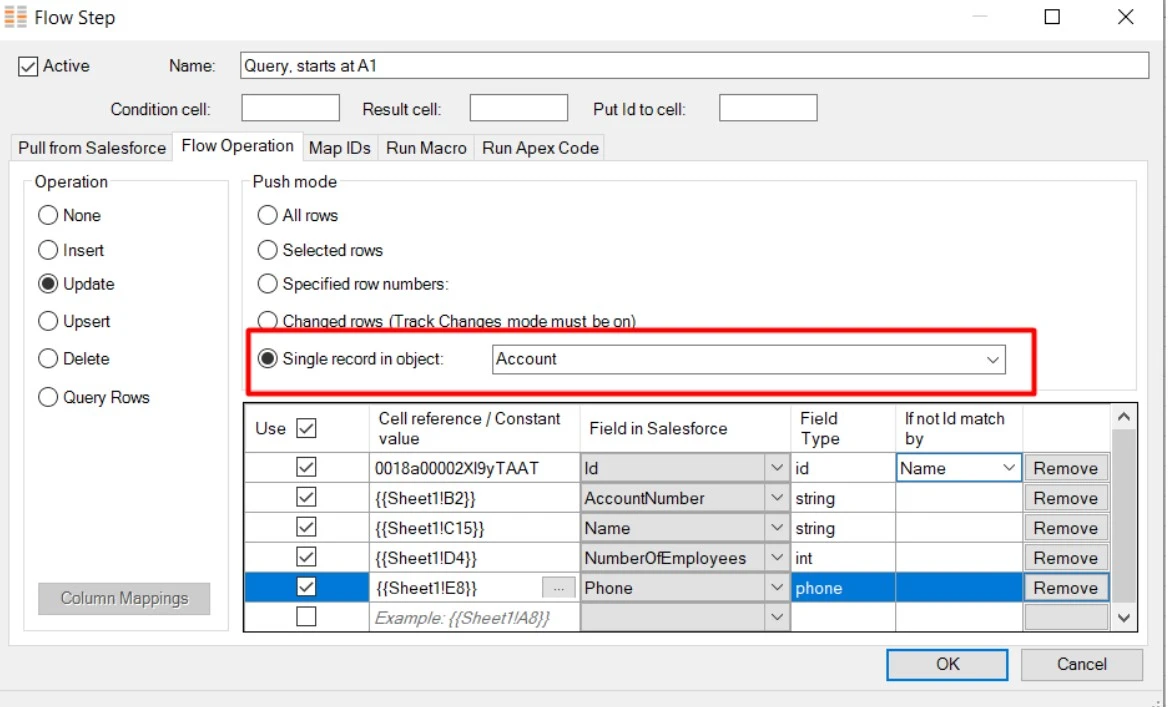
In this same tab, you will need to define the operation, the object and the mappings to upload.
In the mappings, you will be able to reference a cell in your workbook or define a constant value and map it to the corresponding Salesforce field.
Once configured, you can run the flow step with a click of a button on your worksheet or from the ribbon, uploading the mapped data into a Salesforce record.